
Frequently Asked Attributes
With over 120 different standard reports and hundreds of different attributes, we thought it was time we put together a resource in our knowledge base to provide a definition for the fields you can find in Report Toaster.
Currently this is just a shortlist, as the majority of fields we include in our reports are Shopify attributes that can be referenced in their help docs.
Below however is a nice curated list of definitions for the ones we get asked about the most:
If you need help with understanding any of the below, you can always email us to [email protected] and we'd be happy to help.
Inventory Available = The quantity of units you currently have in stock.
Quantity = The quantity of units sold.
Net Quantity = The quantity of units sold, minus items returned.
Fulfillable Quantity = The quantity of units yet to be fulfilled
Price = The price the item is sold for.
Compare-at Price = The original price of the item (before an adjustment or a sale).
Gross Sales* = Price x Quantity**
Discounts = The discount value applied to a sale.
Returns = The value of any goods returned by a customer.
Net Sales* = Gross Sales - refunds - discounts.
Taxes = The taxes applied to a sale.
Duties = The duties applied to a sale.
Shipping = The shipping charges (paid by the customer) to ship an order.
Total Sales* = Net Sales + Taxes + Duties + Shipping
Cost = The total cost of the units sold for a particular product
Gross Profit = The Net Sales minus Cost for a particular product***
Gross Profit Margin = Calculated as ([Net Sales - Cost] / Net sales) * 100.
Shipping Cost = The shipping charges (paid by the merchant) to ship an order.
Transaction Fees = The fees paid to the provider for each transaction
Net Profit = (Net Sales minus Cost) + (Shipping - shipping Cost) - Transaction Fees.
Net Profit Margin = Calculated as (Net profit / Net sales) * 100.
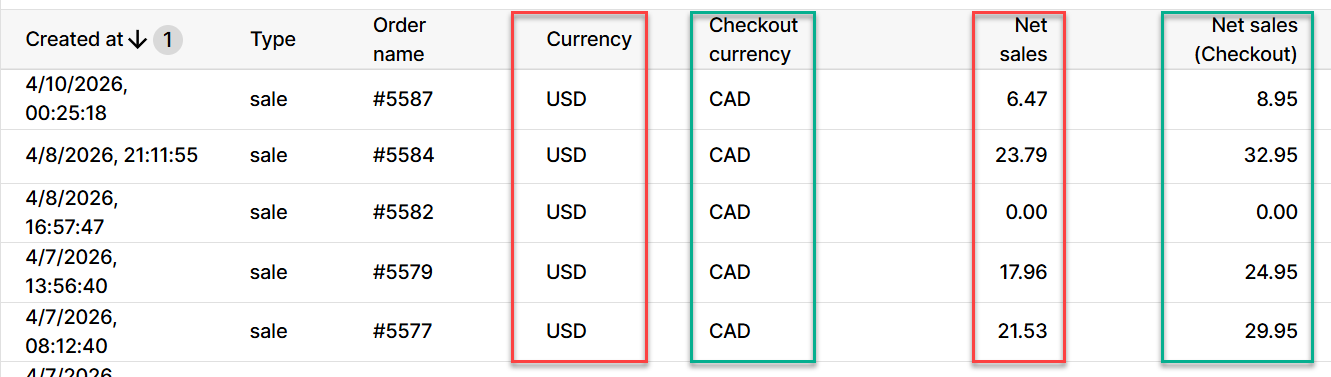
*Gross Sales, Net Sales and Total Sales are also available as fields in Checkout Currency on any Sales report.
This matters if you have customers who pay for an order in a currency different from the one being used by your store
(e.g. Customer pays in CAD but store currency is USD)
**If you have Taxes included in the Price of the product (e.g. for most European customers), then it is removed when calculating Gross Sales (and therefore, Net Sales).
This is because otherwise, Taxes would be counted twice when taxes are added back in to work out Total Sales.
For example, imagine 2 units of a product sold for 100.00 and a tax of 12% was included in that price.
Price minus tax: 100 / 1.12 = 89.29, so Gross Sales = 2x 89.29 = 178.57
Then if a discount of 50% was applied = 178.57 x 0.5 = 89.29
And now if one unit was returned, we'd have the other still = 44.64 in Net Sales
Finally, you would add the taxes back in (12% of the net sales is 44.64 x 0.12 = 5.36), plus a Shipping Charge of 5.00, and we get Total Sales of 55.00
***Note - in line with Shopify's calculations, order level refunds are NOT included into this figure. See here
For a more in-depth overview and examples for many of the attributes mentioned above, you may want to check out some of our other articles:
How Do You Calculate Values on Sales Reports?